

We have some good news! You can now install the SuperCity app on your computer and enjoy the game in a more comfortable and stable way.
And there’s an extra reason to give it a try: install the app and play through it to receive special gifts!

How to install the SuperCity app
Installing the app is easy:
- Log in to SuperCity on the game portal.
- Look for the Install App button at the top of the page.
- Click it and follow the instructions on the screen. You’ll also see an arrow showing you where to click to complete the installation.
- Once the app is installed, SuperCity will open separately, and a game shortcut should appear on your desktop.
- Use this shortcut the next time you want to play!
Please note: the app can only be installed through the portal version of SuperCity.
.png)
Why install the SuperCity app?
The app gives you another convenient way to play SuperCity on your computer.
Once installed, SuperCity will have its own shortcut on your desktop. Just click it whenever you want to visit your city, and the game will open separately from your regular portal tab.
The app is available on Windows and macOS. For the best experience, we recommend using Google Chrome or Microsoft Edge.
Install the app and get two gifts!
To celebrate the launch, we’ve prepared a special two-part gift for you.
Gift 1: Install and play
Install the SuperCity app and open the game through it for the first time during the promotion.
You’ll receive coupons and superbucks as a gift.

Gift 2: Come back the next day
After collecting your first gift, return to SuperCity through the app at least 24 hours later.
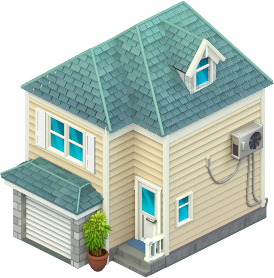
Your second gift includes 20 seasonal currency, the unique Cozy House in the Suburbs: a lovely new building for your city — just for playing through the app again!
How long is the promotion available?
The promotion will be available for 30 days.
You can find it in the right-hand menu inside the game and check your progress there.
The second gift becomes available 24 hours after you collect the first one. Once you have collected both gifts, the promotion will be completed for you.

How to play on the portal?
Simply follow the Portal link and and log in with the Facebook account that you normally use to play SuperCity.
Your city and your level will be waiting for you there — safe and sound. If you need more information about the Portal, check out our detailed guide here.
Ready to try the SuperCity app?
Open SuperCity through the portal, click Install App, and enjoy a more comfortable and stable way to visit your city.
And don’t forget to come back through the app the next day to collect both of your special gifts!
See you in SuperCity!